Friday, April 19, 2019

Update

I try to type a post about 3-4 times per month, but it has 4 weeks since my last post.

What is going on in STEAM and library?

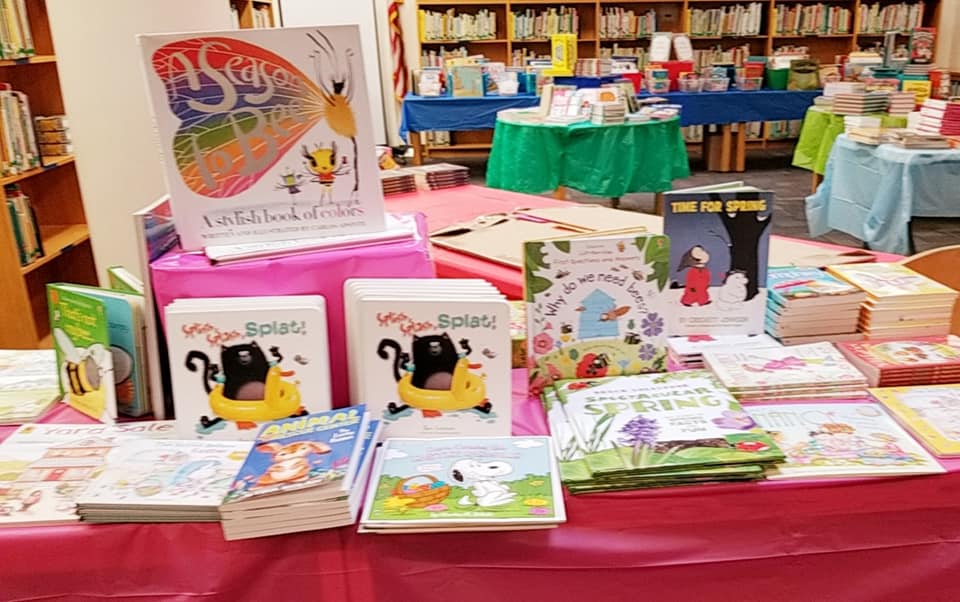
First. we had book fair from April 8 - 13th.  Over $5000 in books were sold resulting in nearly $1000 for new library books and STEAM materials.  The spring book fair was with a local bookstore called "Werner Books".  The selections were nice and prices were reasonable!

During book fair, first and second grade are trying to create and design board games.  The creativity and ideas are fun to watch.  This has been a three week lesson.  First we created rules, a sample board, and tried to play our created games.  Then second week was all about creating the final board and trying them out.  The last week is different for 1st grade and 2nd grade.  1st grade verbally presented their games to peers in a "show and tell" format.  2nd grade is learning how to sign into Office 365, typing up the rules, and sharing the document with me.

I think that we need to play more folder games if we would do this activity again.  Students were not consistently aware of how to make a game.

Here are some pictures of the book fair set up:


3rd and 4th graders are busy working on Genius Hour projects.  The students had to pick a topic, create three questions to research, sign a contract, then conduct the research.  This is a huge project, but it is working better with access to Kid Info Bits through Power Library as well as using TEAMS in Office 365.  TEAMS allows students to save links for quick reference  and citations plus working on the skills of copying and pasting using key strokes (CTRL C to copy and CTRL V to paste).

I feel that this year is going better than last year.  More groups are finding information, creating citations, and answering questions.  A few groups are struggling with staying focused and self-discipline.  In addition, many groups need one on one support to work through their topics.

I will be adding additional pictures of some of the recent STEAM activities.

Look for updates of Seedlings for Schools, Ag Lab, and more!


Saturday, March 16, 2019

STEAM updates

Summer of 2016, a wall was constructed in the library to create a STEAM room.  Then the room got 24 stationary computers.

I was focused on the T of STEAM.  Fast forward to 2019, it time for more space for science and engineering.

This week, half the computers were removed and half the tables were re-arranged.  It looks totally different!

The space is AMAZING.  I have lots of lesson planning to complete, but the transformation is just what I needed.

Starting on Monday, students will be alternating technology for 1 week and the other week will be focused on Science, Engineering, Art, and Math.

In addition, inspired by other librarians I added a "Stick Together" mural display.  Students will be adding squares to the mural for good behavior.  This was purchased from Amazon.  Check it out!
Can you guess what it is?  I will keep you posted on the progress!

Interested in Stick Together murals?  Here is the link Stick Together website


Here is a few pictures of the new space!!!!


STEM OUTREACH

When I started the STEAM program at Wattsburg Elementary Center, I was searching for ideas and options.

Bricks for Kids and Penn State Behrend Youth Education Outreach both offered to bring programs into STEAM for me.  One was a per student fee and one was a donation.  PTO and the principals generously offered the needed funds!

Year 1, the outreach came into STEAM for the day.  They saw 5 grade levels in 1 day and had to return for 5 school days.  For the first year, this worked enough.

Pros:
New experiences for everyone (students, staff, outreach)
Educational experiences

Cons:
Seeing five grade levels in one day
Cost
Planning (snow days, 2 hour delays, etc...)
Time involved for outreach personnel

I had to figure out how to do it different in year 2.  The idea came to do 1 grade level per school day AND create a modified schedule so that everyone got 1 hour of STEM outreach.  I picked and chose carefully based on my experiences in year 1.  Plus, I found that Asbury Woods had a grant funded program to come and do more activities with the students!

Year 2 was a huge improvement, but the location was still needing modification.  The other challenge was coordinating dates, creating schedules, making contacts, securing funding, etc...  The behind scenes work was stressful.

The plan created was as follows:
Grade K - Asbury Woods - Nature Composters
Grade 1 - Penn State Behrend Youth Outreach - 21 Elephants bridge engineering
Grade 2 - Bricks for Kids - Forces and Motion
Grade 3 - Bricks for Kids
Grade 4 - Penn State Behrend Youth Outreach - Candy Bag Engineering

THIS IS YEAR 3 and it was much smoother than year 2.  It was so much easier with the contacts, schedules, and more ready to go!  My major change was moving all outreach to our discovery/gifted room on days that it was not being utilized!  It is nice to set up in one space, but the sound does travel to nearby classrooms.

In addition, we added a science activity with Asbury Woods to the fourth grade opportunities.  The topic was on food chains and plastic pollution.  As of Friday March 15, every student has had an hour of STEM outreach except Kindergarten.  Their STEM OUTREACH date is Friday March 29th!

The students love the opportunity to have a mini-field trip come to the school.  It exposes students to new opportunities.

Where can I get more information?
Asbury Woods website - Asbury Woods
Penn State Behrend Youth Education Outreach - Penn State
Bricks 4 Kidz- Bricks 4 Kidz

Below are some pictures from the first 5 out of 6 STEM outreach days:

Asbury Woods - Grade 4


Penn State Behrend - Grade 4


Bricks for Kids - grade 3


Bricks for Kids - grade 2


Penn State Behrend - grade 1


Monday, March 11, 2019

Family reading

Finding time to be part of scouts, choir, church, and other activities leaves limited opportunities for evening reading.

Excuse or reality...it is what it is.

I am trying to keep up with my 1 picture book a day.  I am using the "1 second app".

A couple of years ago, we read through over 20 Magic Tree House books over 6 months.  Here is that post Reading post
It was great, but this series soon loses its excitement and momentum.  It worked for a while, but quickly interest faded and life interrupted us.

Fast forward to two weeks ago.  My 3rd grader is not challenging herself as a reader and is studying the midwest region.  It was time to pull out my Little House book series.

Currently, we just finished chapter 5.

Pros - great conversation topics and lots of history discussions
Cons - super long chapters

I will keep you posted how we progress!


Did you know this is book 1?

Sunday, February 24, 2019

Hearts, computers, and more!


These two groups finished up  a fun month of snow experiments and arctic animals.  Kindergarten is busy preparing to log into the computer.  75% of the students know their LAST NAME.  This is wonderful since they have to spell it as part of the computer log in!  So we started by just seeing who knows their last name.  We also started making log in cards in 3 out of 5 classes.   This week, we will be logging into the computers!  They will go crazy…it is the most stressful lesson that I teach.  20 Kindergarteners spelling one letter of their first name and their whole LAST NAME then 2 numbers (just for the user name).  The password is more doable.  They have to learn mouse skills, how to read a keyboard, and patience! 

For some science, these two groups finished up  a fun month of snow experiments and arctic animals.  Kindergarten is busy preparing to log into the computer.  75% of the students know their LAST NAME.  This is wonderful since they have to spell it as part of the computer log in!  So we started by just seeing who knows their last name.  We also started making log in cards in 3 out of 5 classes.   This week, we will be logging into the computers!  They will go crazy…it is the most stressful lesson that I teach.  20 Kindergarteners spelling one letter of their first name and their whole LAST NAME then 2 numbers (just for the user name).  The password is more doable.  They have to learn mouse skills, how to read a keyboard, and patience! 

For some science and art, we also talked a little about our heart.  We watch two videos…one from Sci Show Kids and another from Brain Pop Junior.  They also colored a HEART from Crayola.

Human Heart coloring page- awesome! Tells kids what part to color blue and what part to color red

First grade has been reviewing how to type in a website address.  We usually go through a series of clicks on my district website.  This is a daunting process of reading letters off the board or waiting for oral review and then typing them in.  We also review what does “WWW” stand for.  One of the cool websites is STARFALL.  This “free-mium” site was recently updated.  The games are new and different.  Overall, the new content is a hit! 

Finally, we also did the same heart videos as kindergarten, but the first grade coloring sheet was more detailed! 

This Awesome Anatomy coloring page focuses on the heart and all the different parts of it.


Here are the links to the videos and worksheets!  


Here is a link to Brain Pop Junior.  You might need a log in code!
Brain Pop JUNIOR Heart video


Saturday, February 16, 2019

SADAKO and Paper cranes

The art teacher and I are collaborating to make the ASIAN CULTURE themed art show amazing.  Initially, she proposed a three dimensional dragon.  YIKES was my first thought.

I went back to my room after our conversation, looked through pinterest, and just waited for inspiration.  I felt more confident with origami.

Then I found the idea of Sadako and the 1000 paper cranes.  AMBITIOUS, but doable.

So, second through fourth grade have been learning about the Japanese art form of origami.  We briefly discussed the story of Sadako and the 1000 paper cranes.  If you want a summary of the story, feel free to look at this book summary - Sadako
Plus, we found a great You Tube tutorial.


The lesson has been a learning process and a test of patient and tenacity. 

Week 1 - NO class finished a crane,  I let every student take their partially completed crane.   Encouraged them to try to finish at home using a library book, you tube tutorial, or their method.  They did not need them to return them!  Many students left feeling frustrated and "bummed" with a partial crane.  I was left in shock on the first day on how this was really going to take.  How do handle this moment is not in any teaching course or manual!

Week 2 - I precut the squares of scrap paper and work hard to keep things moving.  It takes 2nd grade 50-60 minutes, but EVERYONE leaves with a crane.  Third grade takes about 45 minutes which means that they have a few minutes to watch a heart video, take a picture with the cranes, and clean up.  Fourth grade is working the best since we are down to 35-45 minutes.  They can usually complete a couple of levels of Edutyping on the computer at the end of STEAM.  Not all groups have seen me for week 2 yet!

The final week will be for the art show using recycled book pages, recycled pictures from magazines, and more!  Making 300 squares is a bit daunting, but it is going to look awesome.

Mrs. Long and I have figured out how and where we want to hang our 300+ cranes.  Plus any student who wants to make more will have the option through out March during free choice time in art and STEAM.

Want to make your own crane?
Check out this video!


Saturday, January 26, 2019

January updates

This month is flying by...

So what are we doing in STEAM and library?

SNOW and  INTERNET SAFETY!

Here is a highlight of each grade level:

Kindergarten - Winter centers, polar picture/skip counting puzzles, snow experiments and more!  Most are recycled from previous years, but I did add two snow science experiments. 

Experiment inspiration -
Melting snow
Salt experiment

First grade - Snow research on Pebble Go, make a recycled materials dendrite, and do skip counting puzzles.  Some of the groups also got to do the two snow science experiments

Second grade - Snow research on Pebble Go, make a recycled materials dendrite, and are starting coding on Kodable website

Third Grade - Read the "Technology Tail" and worked on Interland.  In addition, some chose to make a recycle materials dendrite.  Plus we are starting to learn how to use our printers and solve the first step of a Rubix cube

Interland - Be Internet Awesome
You Can Do the Cube

Fourth grade - same as third grade but they also did some paired programming on  Code.org to "catch everyone up to the same spot

It has been a busy month plus 2 hour delays, snow days, teacher work days, meetings, and more!

Look for some cool pictures below.


Image result for technology tail


Wednesday, January 16, 2019

WQLN Competition

Wattsburg Area Elementary Center came together and worked hard to win the WQLN reading competition this fall.

The competition runs from September 1 to November 30.  Students started out by reading a PBS based book in library.  Students turned in forms and earned a STAR outside the library.

Our school won all three categories - school, class, and student winners.

Here are some of the amazing statistics:

Wattsburg Area School District read 16, 059 books.  Our school won the traveling trophy as well as $250 for new books!

Top students who read over 200 books:
1. Cheyanne B - 693 books - won a trophy lap desk, barnes and noble gift card, and book light!
2. Ezra D - 461
3. MiMi M - 390
4. Madison N - 262
5. Alcide A - 268
6. Jackson W - 217

Top 3 classes:
1. Mrs. Webb - 2030 - won a plaque and a pizza party for the classroom
2. Ms. Baltes - 1967
3. Mrs. Shores - 1943

Today was our school wide celebration and assembly

Here are a few pictures of the assembly:


Plus we were featured in the newspaper twice and on the news once.
WQLN article 1
WQLN article 2 
Your Erie News 

Finally, we get a shout out on the WQLN website.
WQLN website


Monday, December 31, 2018

Year in Review

As 2018 comes to a close, I like to look back then forward.

My most popular post was my post last January on the WQLN Reading Competition!
Here is the link: LINK

My favorite new lessons were the Rubix Cube Mosaics and the marble design challenges.

I was able to get new materials from Donor's Choose as well.

So what do I have in store for 2019????

I want to pick my "new" word for the year, start a 365 picture book challenge, and continue to find new resources for my school.

I explain the "One Word" idea in last year's post - Patience

or you can check out this awesome website and book - Jon Gordon's One Word website

My new word is "Creativity".  I want to find ways to update my house (decoration and organization wise).  I want to be creative in my instruction and program at school.  I want to model and expand my personal creativity!


For my 365 book challenge, I plan to try a new app called "One Second".  It takes a picture or 1 second video each day and creates a montage at the end of the year!

One Second


What are your goals for 2019?

Sunday, December 16, 2018

Holiday fun 2018

Kindergarten is working on their first engineering design challenge.

Student read "12 Sleighs of Christmas".  Then they had to design a new sleigh using 1 straw, 1/2 piece of construction paper, 1 pipe cleaner, and 1 egg carton section.

The challenge was in getting Elmer's glue to dry and stick on the Styrofoam.  I think that we could have skipped this material.

The goal is to get them to slide down a "zip line" since Santa's sleigh needs to fly.  I gave them 10 minutes the first class, 40 minutes the second class, etc...

Another challenge was storage!  How do you store 100 gluey sticky creations flat?

Overall, the students are having fun and I am seeing their unique personalities!


A Sleigh is started here
Can we test our sleighs like engineers?
Great question from this student!  So we created a second make shift zip line.
Sleigh in process!
This student thought outside the box then inspired/helped friends!
Engineering is a messy process of trying to figure it out!


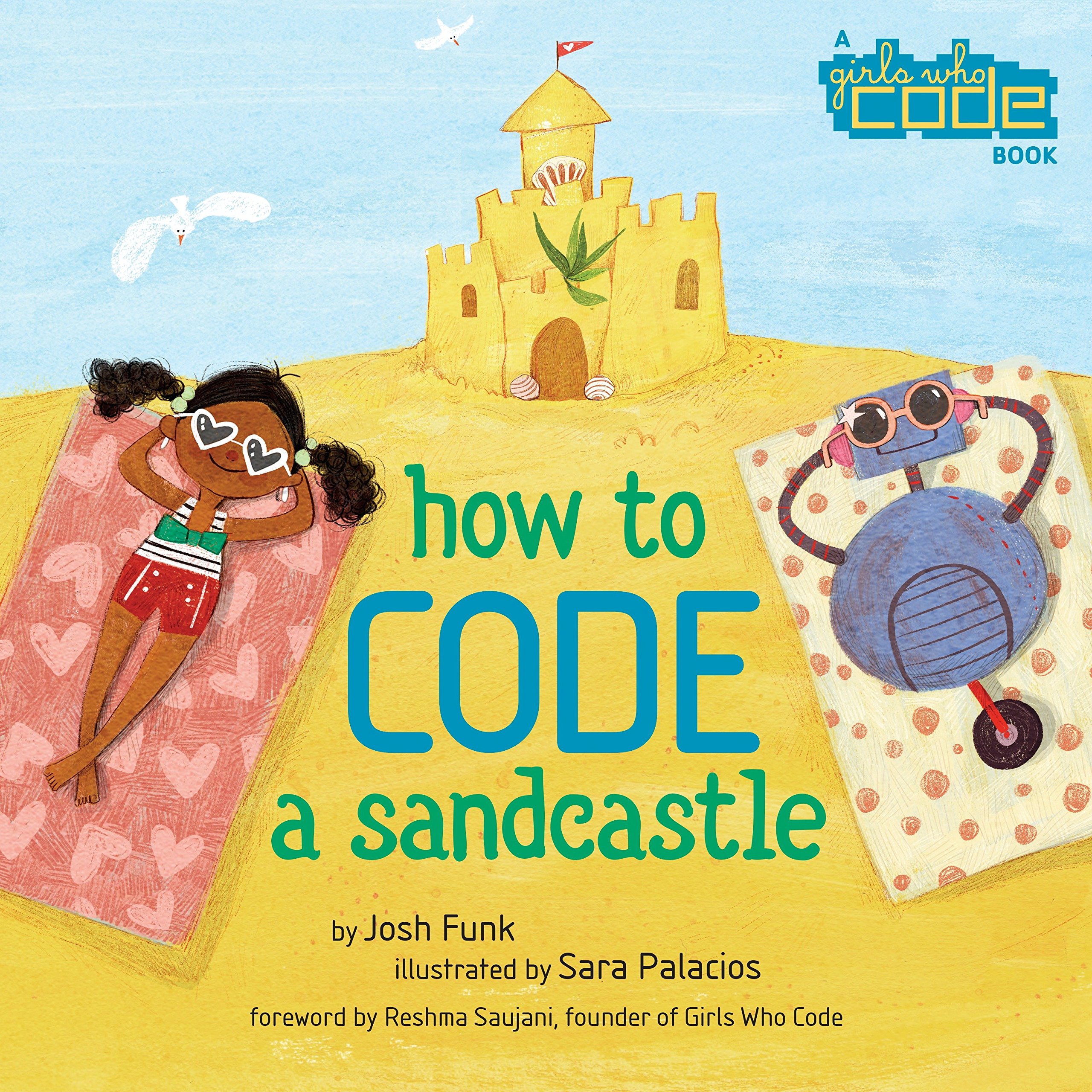
1st and 2nd graders are working on the basics of coding.  I have not done coding so soon and they are ROCKING it!  First we read "How to Code a Sandcastle" for background.  This was much more readable for this age level.

Image result for how to code a sandcastle

Next, we started with Snoopy Snowball Battle from Hour of Code and Code Sparks.


Snoopy Snowball Battle
Finally, this week started doing Google's Santa Village website.  It has several coding games built into it for first grade. 
Here is the link to Santa's Village
Second grade is trying out Grinch Hour of Code.  Two of the students in second grade completed all 20 levels in less than 1 hour!  They loved seeing Wattsburg School district on the "Hour of Code" website.
Link to Grinch Hour of Code
Link to Hour of Code

Finally, third and fourth grade completed the Binary Code ornament activities.  I did this two years ago.  I felt like that it went so much better this time.  I understood the topic, more organized, and had better video resources.
You can see my previous post here - Binary Ornaments 2016
In addition, I updated my Sway presentation with new videos and fun videos!  Pictures to follow soon

Go to this Sway

This week, we are doing more holiday fun and finish up the activities above!


Sunday, December 2, 2018

Marble run wrap up

The marble runs were such a successful project that I wanted to build in time for other skills.

Students got a chance to present/show off their creation to their peers.  I loved watching the group dynamics.  Many students had to get over a true fear of speaking in front of others.  Everyone got up with their group and we got see all of the projects.  Only 2 projects got "lost" in the week between book fair and thanksgiving break.

The next thing that most of the students got to do was a survey about the project.

I found the data fascinating.  We will use this later to create our own forms online later.  I also discovered a way to make the survey tell me each child's answers and how to make them all anonymous.  Pros to sign in was the accountability piece while the con is the time to sign into office 365.  Pros to the anonymous was the quick access to the survey.  Con was that I do not who said what in the open ended responses.  A few classes missed the survey for a few reasons - 2 hour delay, high absentee rates with a crazy weather day, musical practice, etc...

Here are some of the survey highlights:

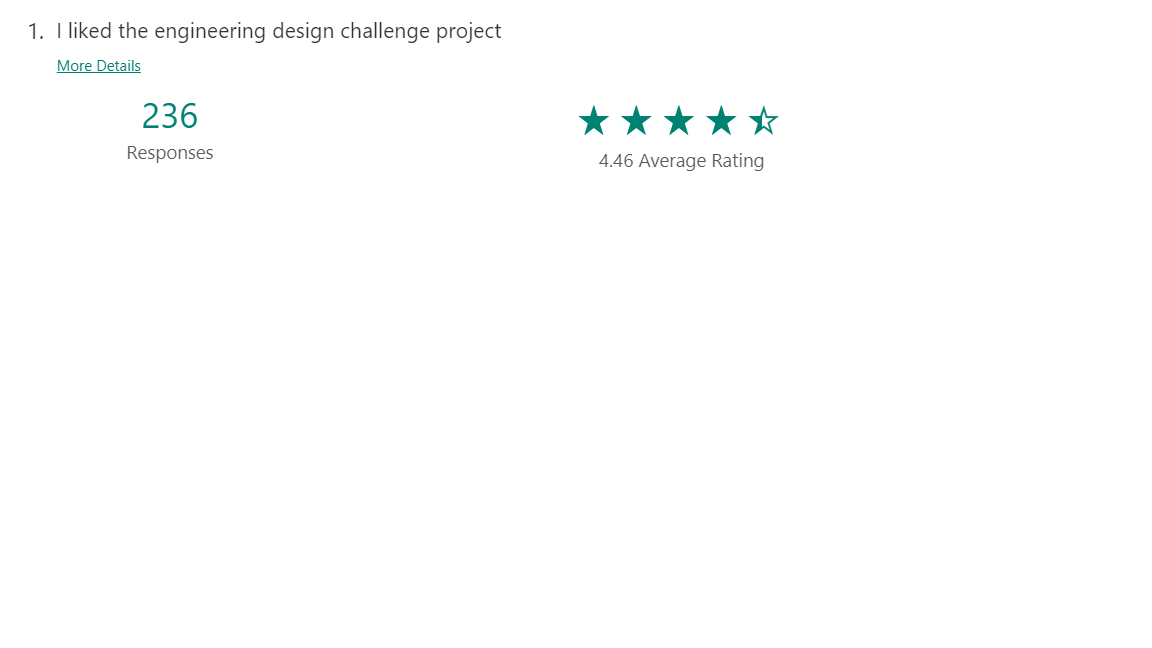
Question 1 was a star rating of the project,   Here is the snap shot of the results:


The open ended responses were equally interesting.  Many showed thought and reflection.  One student wanted it quieter to work.    Good thing to think about next time!

My favorite was a little boy who said - "seeing it work" was his favorite part!  YES.  This is the best part - seeing your success :)

For the question, what would I change.  Again, some were brutally honest - a different partner.  Some had predictable answers - more materials, more time, more ways to decorate it, etc...

Finally, I asked if they wanted to share anything else with Mrs. Hedderman.  Here is my favorite answer:

"I loved this projcet! I think you should do this for every class/every year! I hope the other grades love it! I mite do this at home! I love it so much! I can't stop talking about it! I'm so happy that I can do this at home.My brother can't wate to try to make one! Or my mom!My aunt loves crafts and so do I !So I am going to teach her how to make one!"

My take away is a better way to store the projects, a better way to take home projects so that there are less upset students.  


It worked well for the first project!   We also found the online marble run website.  It works best it on Google Chrome.  Our IT department had to "white list" it.  There is a build mode and a gallery mode.  

https://www.marblerun.at/tracks/new

Now onto winter/holiday projects.